Choose ZeroLag first when your decision is specific: you play CS2 on Windows from Turkey, you want to see your direct route beside available ZeroLag paths, and you would rather pay $3.99 monthly after a three-day no-card trial than buy a larger gaming toolkit. ZeroLag is designed to make that route decision visible. It does not ask you to assume that an optimized route is always healthier than the direct route.
NOPING ALTERNATIVE · CHECKED AUGUST 12, 2026
A NoPing alternative you can test before paying.
ZeroLag gives Windows CS2 players in Turkey three days to compare routes without a card. It is a free trial, not a free-forever routing plan. Afterward, Pro costs $3.99 per month only if you choose it.
Need a free NoPing alternative with no subscription? Start with the no-cost checks below. Pay for routing only when repeated tests show a useful improvement.
Try ZeroLag free for 3 daysWindows 64-bit · No card required · No automatic payment
See the measured 2-minute-16-second journeyZeroLag
vsNoPingZeroLag plan$3.99 / month
ZeroLag trial3 days · no card
NoPing trial1 day · no card
Decision ruleSame server · 3 rounds
DirectMeasureGame server
The short answer
ZeroLag is the narrower NoPing alternative for a Turkish CS2 route test.
Choose NoPing first when breadth matters more than that narrow workflow. NoPing says its service covers more than 3,000 games and more than 2,000 servers, supports Windows 10 or newer, iOS, and Android, and includes tools such as Multi Connection, Multi Internet, FPS Boost, Aim Trainer, Pro Settings, AudioPads, and Replays. Those features solve jobs that ZeroLag's current launch scope does not try to cover.
The honest answer is not that one product is universally better. A route optimizer can only improve the part of the path it controls, and the useful route can change with congestion or server selection. Your best option is the one that produces a repeatable improvement on the server you actually use, without making you pay for tools you will not use.
Decision table
The differences that matter before you install either app.
Decision point
ZeroLag
NoPing
Best fit
Windows players in Turkey who want a measured CS2 route decision before subscribing.
Players who want broader game and device coverage plus utilities beyond route optimization.
Product scope
A Turkey-first route comparison and selective game-traffic connection for supported games, with CS2 as the clearest current workflow.
NoPing says it supports 3,000+ games and 2,000+ servers through a broad game-booster interface.
Platforms
Windows 64-bit.
Windows 10 or newer, iOS, and Android, according to NoPing.
Free trial
Three days with no card. The trial ends without an automatic subscription or payment.
One day with no card, according to NoPing's official download and home pages.
Monthly price
$3.99 monthly, charged only after you choose the paid plan.
Check NoPing's current checkout. Its official pricing page did not expose a stable amount during our August 12 check.
Route approach
Compares the player's normal route with available ZeroLag nodes and recommends connecting only when an alternative looks healthier.
NoPing markets AI-assisted route selection and Multi Connection using up to five simultaneous routes.
Extra tools
Connection diagnostics, route history, and a focused route decision for supported game traffic.
Multi Internet, FPS Boost, Aim Trainer, Pro Settings, AudioPads, Replays, IP Block, and monitoring are shown in NoPing's product materials.
Cancellation
The paid monthly subscription can be cancelled from the account subscription screen.
NoPing's support guide directs subscribers to Payment History, then the current subscription and cancel action.
NoPing details above come from NoPing's official home, download, pricing, and support pages checked on August 12, 2026. Product scope, plans, and interface details can change. ZeroLag has not independently verified NoPing's performance claims.
Different product shapes
A focused route decision versus a broader gaming toolkit.
01 / 03ZeroLag starts from a small question: is an available ZeroLag path healthier than your normal route to this CS2 server right now? The Windows app checks direct latency and available nodes, then gives the player a recommendation. If the direct path is as good or better, the honest result is to stay direct. If a ZeroLag path looks healthier, the player can connect game traffic through that path while unrelated traffic stays on the normal connection.
That focused workflow is useful for players who do not want every gaming utility bundled into one subscription. It is also easier to judge. You can hold the server, time window, and home connection steady, then compare direct and ZeroLag measurements. The result is personal to your line rather than a general claim that a gaming route service always lowers ping.
NoPing presents a broader product. Its official site describes a three-click game-optimization flow, more than 3,000 supported games, more than 2,000 servers, and AI-assisted route selection. The same site markets Multi Connection with up to five simultaneous routes and Multi Internet with support for up to six internet providers. It also promotes tools aimed at FPS, settings, practice, audio, replays, IP blocking, and system monitoring.
Breadth is not automatically waste. A player who rotates through several games or wants mobile support may get more value from a broader catalog. A player who needs to combine two connections has a job ZeroLag's current launch offer does not claim to solve. The tradeoff is that more features do not answer the route question for your particular CS2 server. You still need a controlled test.
Free options and trial terms
What can you try without paying?
02 / 03Start with your direct connection. Pause downloads and cloud uploads, then replay the same server at your usual gaming time. If you already have an Ethernet cable, compare wired play with Wi-Fi. Change one thing per round. These checks need no routing subscription, but they do not create a new route through your provider.
If those checks remove the spikes, keep the simpler setup. If ping stays high, record the server, time, typical ping, spikes, and packet loss. A route trial can then answer a narrower question: does a different path help this destination? A browser ping test is useful background, but it does not prove your CS2 match route improved.
ZeroLag's three-day CORE trial needs no card and ends without automatic payment or subscription. Use it for repeated Windows CS2 comparisons on supported Turkish routes. After the trial, continued Pro access is optional at $3.99 per month. A free download does not mean permanent free routing, and reinstalling is not a plan for continued trial access.
NoPing's official homepage advertises one free day without a card, checked September 23, 2026. That is also a trial, not evidence of a free-forever plan. Its public pricing page did not show a stable amount in this check. Confirm the billing period, currency, total due, and renewal terms in NoPing's own checkout before paying.
Compare direct, ZeroLag, and NoPing separately on the same server. Repeat each round under similar conditions, including busy hours. Keep your normal route if the alternatives are unchanged or worse. If one route is repeatedly more stable, judge the subscription against that result rather than its best single reading.
What route tools can fix
A better path helps only when the path is the problem.
03 / 03Game traffic crosses your home network, internet provider, regional transit networks, and the game server's network. A route optimizer can sometimes avoid an indirect or congested section between your provider and the server. That can improve latency stability, packet delivery, or the size of spikes. It cannot shorten the physical distance to a remote server, repair an overloaded game server, or guarantee that a different path stays healthier all evening.
It also cannot solve every symptom players call lag. Unstable Wi-Fi, a saturated upload, downloads running in the background, router bufferbloat, and packet loss inside the home can make a match feel bad before traffic reaches either service. Low frame rate, frame-time spikes, shader compilation, thermal throttling, or a graphics-driver problem can feel similar while having nothing to do with the network route.
Before paying for ZeroLag or NoPing, separate those causes. Use Ethernet if possible, pause large transfers, close unnecessary launchers, and watch whether the problem is ping, jitter, packet loss, or FPS. If the direct route is already stable and the game still stutters, route software is unlikely to be the first fix. If the route changes produce a repeatable network improvement, then the subscription decision has evidence behind it.
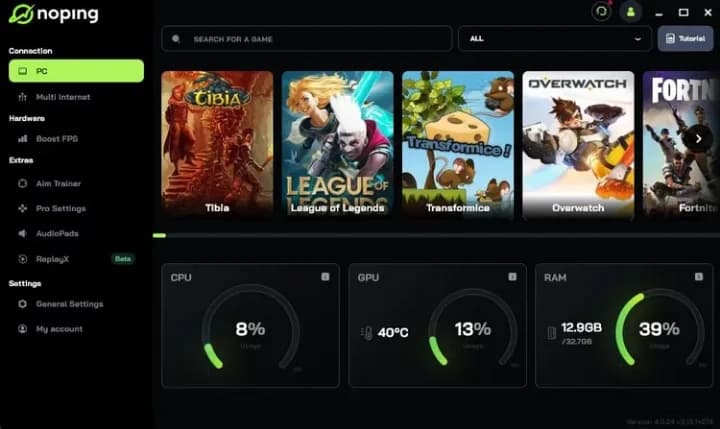
Official product visual
NoPing's interface shows why it is the broader option.
The official NoPing client image places a large game catalog beside Multi Internet, FPS Boost, Aim Trainer, Pro Settings, AudioPads, Replays, and system monitoring. That breadth is a real advantage when those are the jobs you need. It is not proof that NoPing will produce a better route to your CS2 server.
View the current NoPing siteWhich one fits you?
Pick the narrower product only when the narrower job is yours.
Try ZeroLag first if
- You mainly play CS2 on a Windows 64-bit PC from Turkey.
- You want to compare your direct route with an available ZeroLag path before paying.
- A three-day no-card trial gives you enough time to repeat the test.
- You prefer a $3.99 monthly route service over a bundle of gaming utilities.
- You want unrelated browsing, voice, and download traffic to remain on the normal connection.
Review NoPing first if
- You need a broad catalog covering many games rather than a CS2-first workflow.
- You want Android or iOS support in addition to a Windows app.
- You need Multi Internet or want NoPing's five-route Multi Connection feature.
- FPS Boost, Aim Trainer, AudioPads, Replays, or system monitoring matter to you.
- You prefer NoPing's broader game-booster interface and can evaluate it during a one-day trial.
NoPing may be the better fit for a player with several games, several devices, or a need for connection-combining and extra utilities. ZeroLag does not currently match that breadth, and this page should not pretend otherwise. The strongest ZeroLag case is narrower: a Turkish Windows player wants to know whether an alternative path helps the CS2 server they actually use, then wants a low monthly price if the answer is yes.
Do not choose ZeroLag merely because it costs less, and do not choose NoPing merely because it lists more features. Choose the smallest product that solves the measured problem. If neither app produces a repeatable improvement, keep your direct route and investigate the home network, ISP, game server, or PC instead.
A fair test
Use the same server, similar time, and three rounds per route.
A fair ZeroLag versus NoPing test is simple enough to repeat and strict enough to resist one lucky result. Run the products separately. Never compare one app on a quiet morning with the other during an evening congestion peak.
- 01
Fix the local conditions
Use Ethernet if you can. Pause downloads, cloud backups, streams, and updates. Close unrelated launchers, and note whether anyone else is saturating the connection. Keep the same router, PC, and network interface for every round.
- 02
Choose one real CS2 destination
Use the same community, FACEIT, or match server region for the whole comparison. Save the connect address when appropriate. Changing destinations can change physical distance and transit networks, which would make the product comparison meaningless.
- 03
Measure the direct route three times
Start with no optimizer connected. Record three short readings in the same time window. Note median ping, visible spikes, jitter, and packet loss rather than saving only the best number.
- 04
Run three ZeroLag rounds
Let ZeroLag compare the direct path and available nodes for that destination. If it recommends a healthier path, connect and repeat three readings. Preserve a direct-better or tied result instead of treating it as a failed test.
- 05
Run three NoPing rounds
Disconnect ZeroLag before opening NoPing. Select the same game and destination conditions, then record three more readings. Do not run both route tools together because you would no longer know which network path produced the result.
- 06
Compare medians and stability
Compare the middle result from each three-run set, then look at spikes and loss. A one-millisecond difference is rarely meaningful. Prefer the route that remains consistently healthier, and repeat on another day before subscribing if the outcome is close.
Keep a small table with route, time, median ping, jitter, packet loss, and any obvious spikes. The winning product is not the one with the lowest marketing estimate. It is the one that improves the match conditions you can reproduce. If direct wins, direct is the correct result.
Straight answers
What players ask about NoPing alternatives.
Is ZeroLag a NoPing alternative for CS2?+
Yes, for a narrower use case. ZeroLag is a Windows route-comparison service focused on helping players in Turkey compare their normal CS2 route with available ZeroLag paths before choosing a $3.99 monthly plan. NoPing offers a much broader game and device catalog.
Is ZeroLag or NoPing better for lowering ping?+
Neither can be named the universal winner. Results depend on your ISP, city, match server, time, and current route. Test the same destination under similar conditions and compare several readings rather than one best result.
Is ZeroLag a free NoPing alternative?+
ZeroLag offers a free three-day CORE trial, not permanent free routing. No card is required, and no subscription starts automatically. Continued Pro access is optional at $3.99 per month. For a no-subscription starting point, test your direct connection with downloads paused and wired networking if available.
How much does ZeroLag cost compared with NoPing?+
ZeroLag Pro is $3.99 monthly or $35.88 yearly ($2.99/month). NoPing's official pricing page did not expose a stable amount during our August 12, 2026 check, so verify NoPing's current checkout rather than relying on an old or regional price quoted elsewhere.
When is NoPing the better fit?+
NoPing may fit better when you need thousands of supported games, Android or iOS, Multi Internet, Multi Connection, or extra tools such as FPS Boost, Aim Trainer, AudioPads, Replays, and system monitoring.
Can either service fix FPS drops or bad Wi-Fi?+
A route tool cannot repair unstable Wi-Fi, home-network congestion, an overloaded game server, graphics settings, drivers, or a slow CPU or GPU. Diagnose ping, jitter, packet loss, and FPS separately before choosing a subscription.
Can I run ZeroLag and NoPing together?+
Do not run them together for a comparison. Two route tools can interfere with each other and make the path impossible to attribute. Test direct, ZeroLag, and NoPing as separate rounds on the same destination.
Sources and related reading
Competitor claims come from NoPing's own pages and were checked on August 12, 2026. ZeroLag has not independently verified NoPing's performance claims.
MEASURE BEFORE YOU PAY
Test your route for three days.
Compare your normal CS2 path with available ZeroLag routes on the server you actually use. Subscribe for $3.99 monthly only if the result earns it.
Download ZeroLag freeWindows 64-bit · Three-day trial · No card · No automatic payment